
If you work with elementor you might see Text Editor Widget have some issue on typography change.
Font size and some other style not work properly. Maybe they will fix it next update but until that you can use simple CSS in your custom CSS area to fix this issue
If you use the free version of elementor you can go Customizer > Custom CSS or If you have Pro version of elementor you can use their custom CSS panel
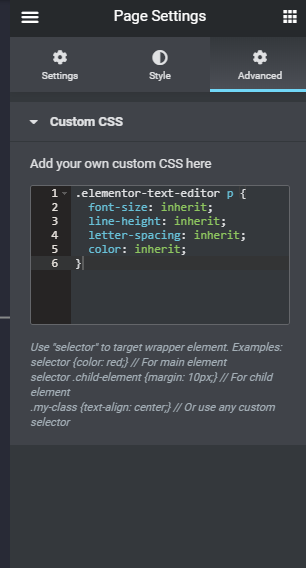
Put this css code the place you prefer to use custom css
Custom Css
.elementor-text-editor p {
  font-size: inherit;
  line-height: inherit;
  letter-spacing: inherit;
  color: inherit;
}
That’s all. Let me know if you still have issue.

2 Comments
I pasted the css code into the page and it applied on the backend, but when I click “publish” the font size reverts on the live end. Is there a way to apply the changes so they will stick when published? Thanks.
I think update Elementor don’t have this issue anymore. Please send screenshot of the issue in my WhatsApp. i will try to help you. Thanks